The shop counter that keeps working when the internet stops
Point of sale, stock and repair tickets for retail and device-repair shops. Run it in the browser, or install it on the counter PC and work entirely offline — both are included in your plan.
- Desktop app works with no internet
- Desktop app keeps your records encrypted on your PC
- VAT and sales tax done properly
Free trial: 30 days on Basic, 14 days on Pro. No card required. Plans from $49/month.
How a day runs
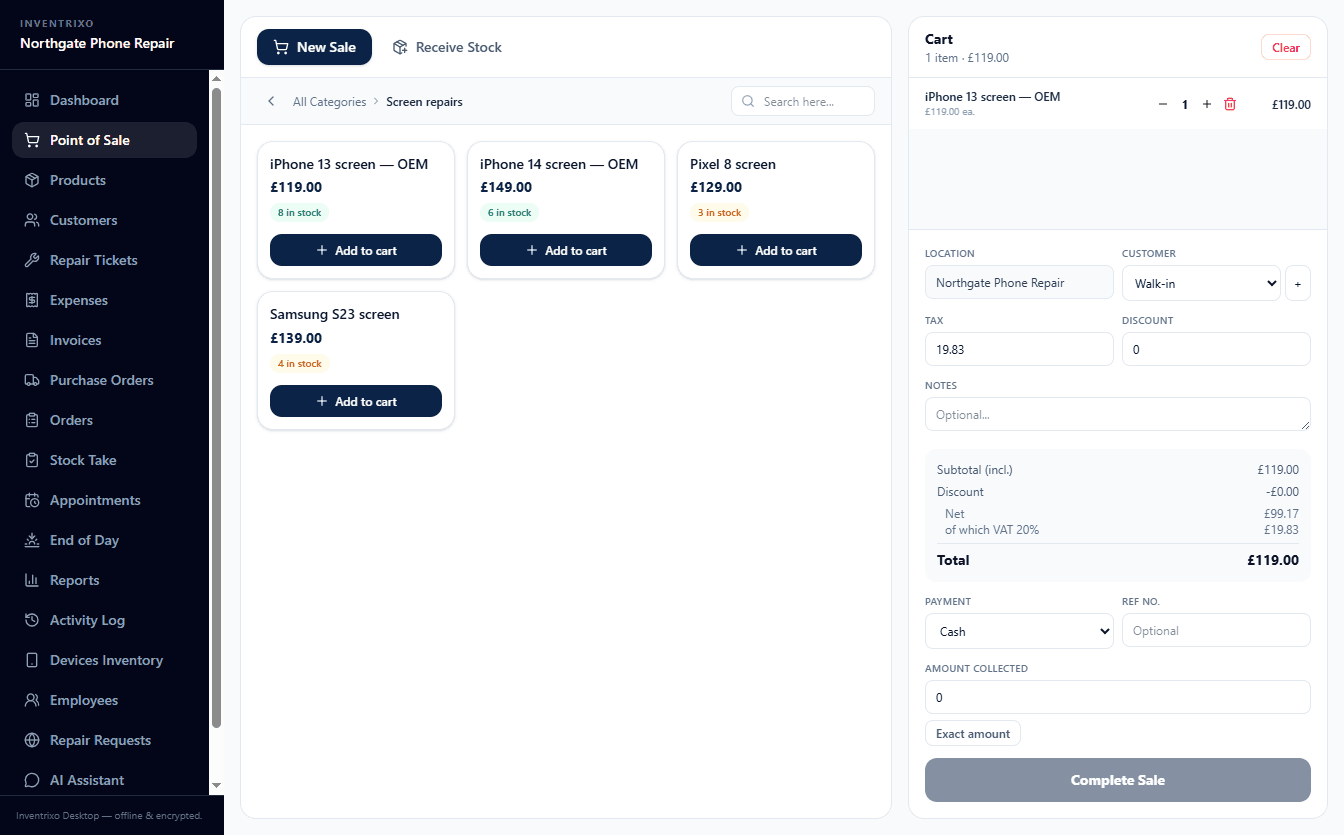
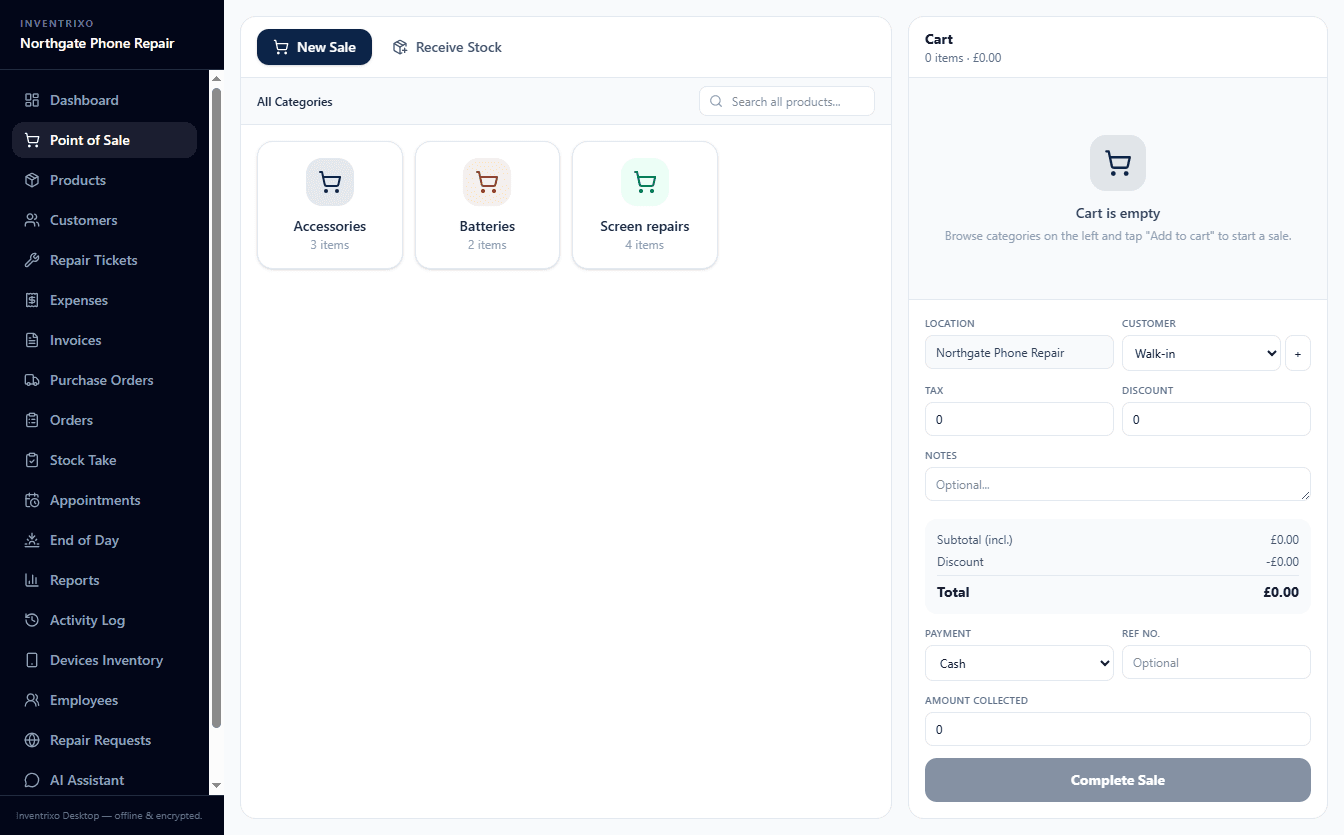
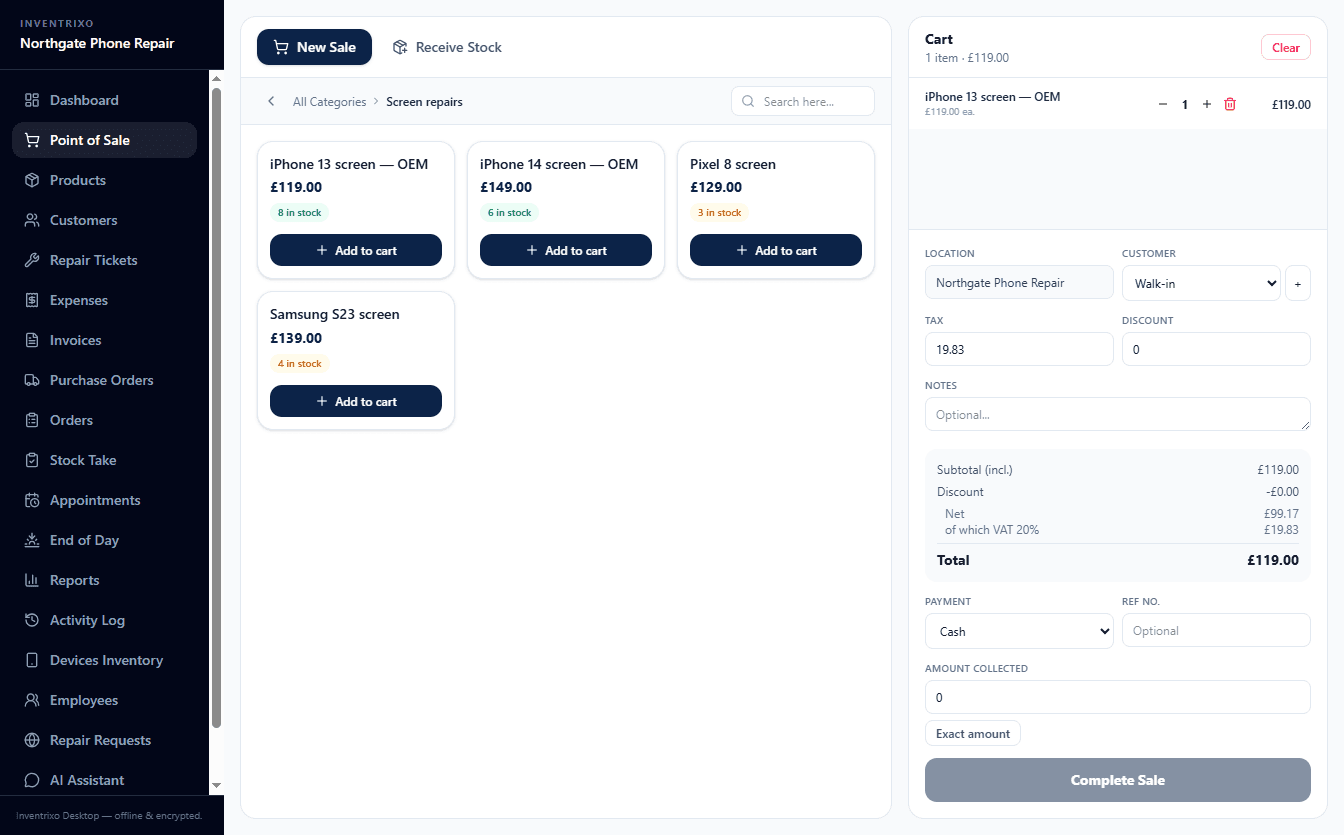
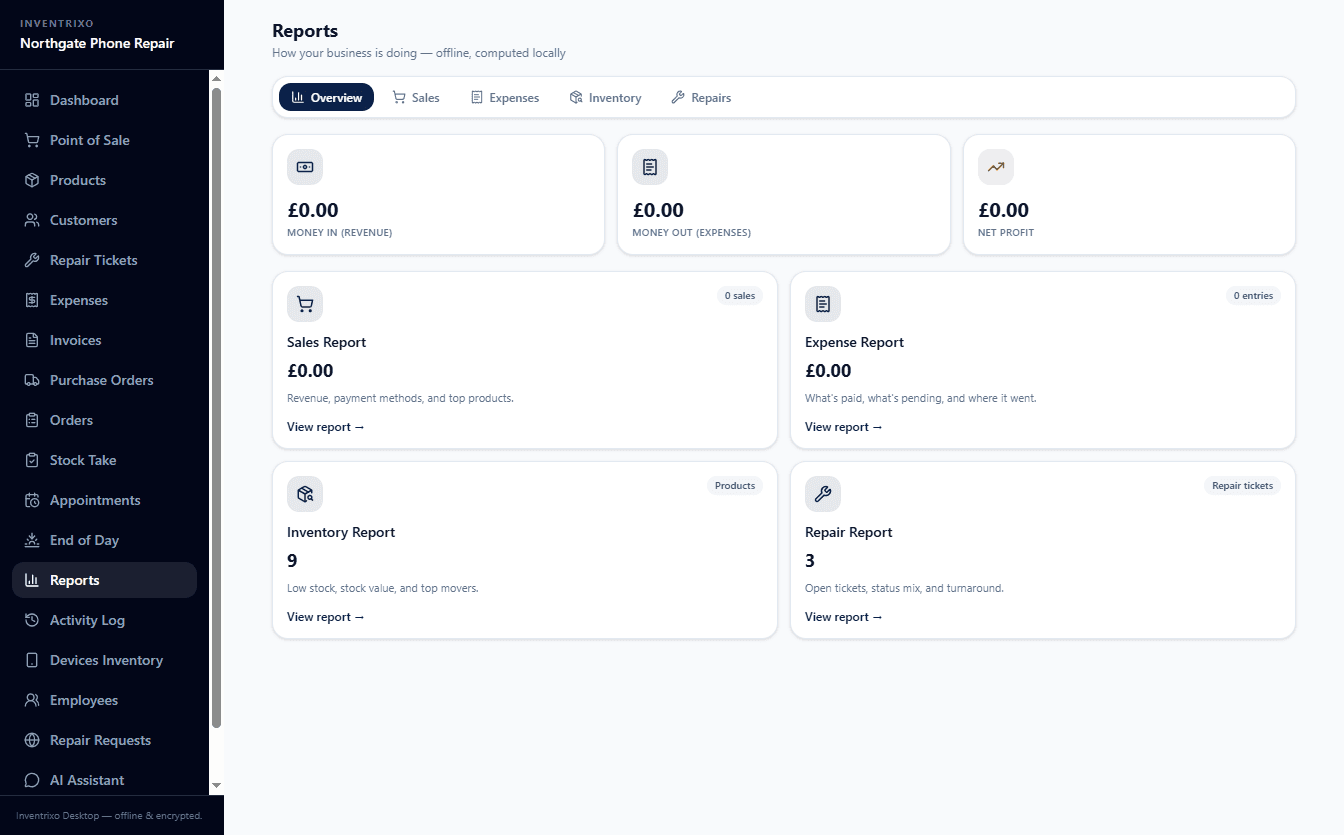
From the first product to the day's takings, in the real application. These are screenshots of Inventrixo running a UK phone repair shop, with its real prices, real stock counts and real VAT arithmetic.
Repairs are a first-class job, not a notes field
A phone repair shop is three businesses in one coat: retail, repairs and stock. Most till software handles the first and gives repairs a text box. Here a repair is a ticket with a device attached.
- What a ticket carries
- The customer, the device, the fault, your diagnosis and the estimate, on one record.
- A device with a history
- The IMEI or serial number is stored, so a phone that comes back is recognised and everything you did to it last time is one click away.
- A clear status at every step
- Every ticket moves through fixed stages, from received to ready for pickup, with who changed it and when. Anyone at the counter can answer whether a phone is ready at a glance.
- Paid at the same counter
- A finished repair goes through the same till as a sale, so it lands in the day's takings and against the customer without anyone typing it twice.
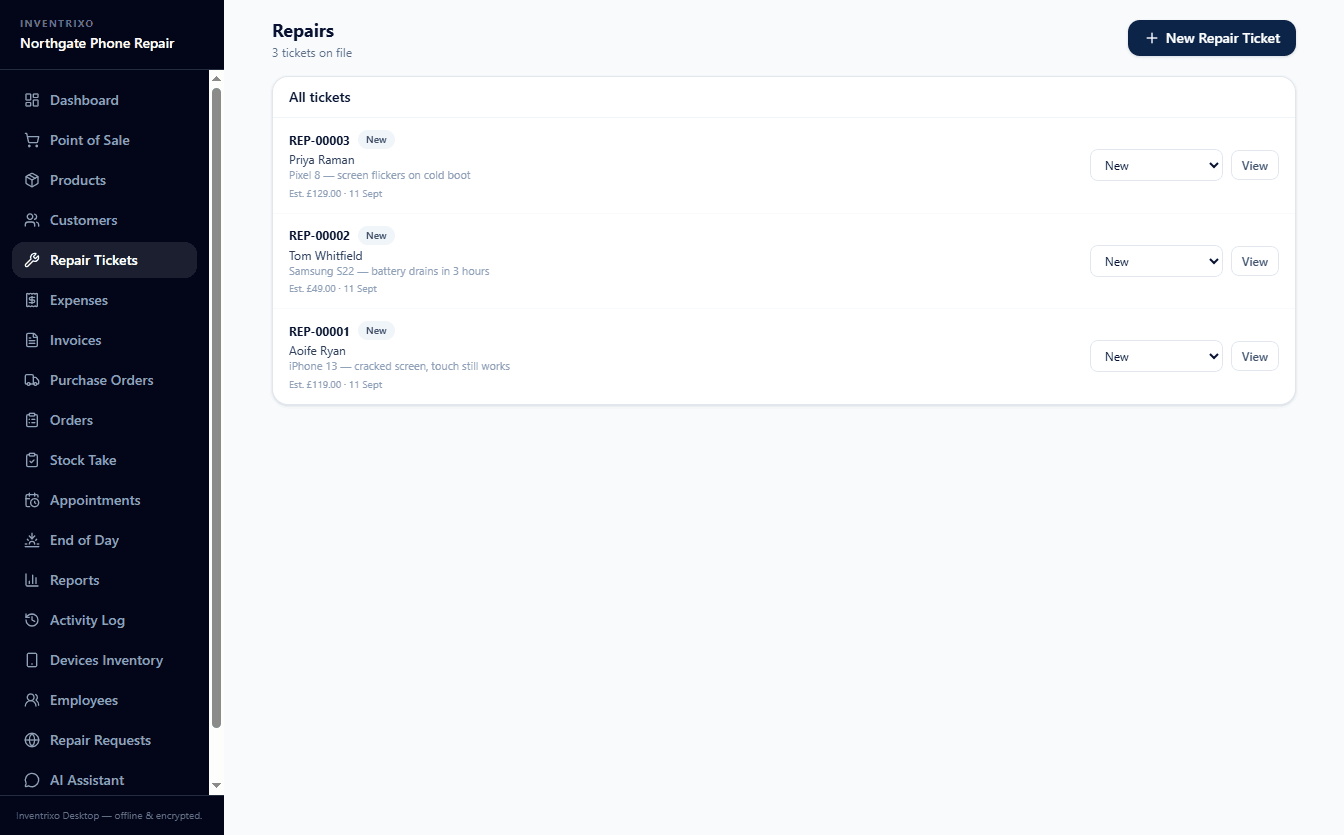
The repair list in the desktop app: customer, device, fault and estimate at a glance.
Stock you can trust
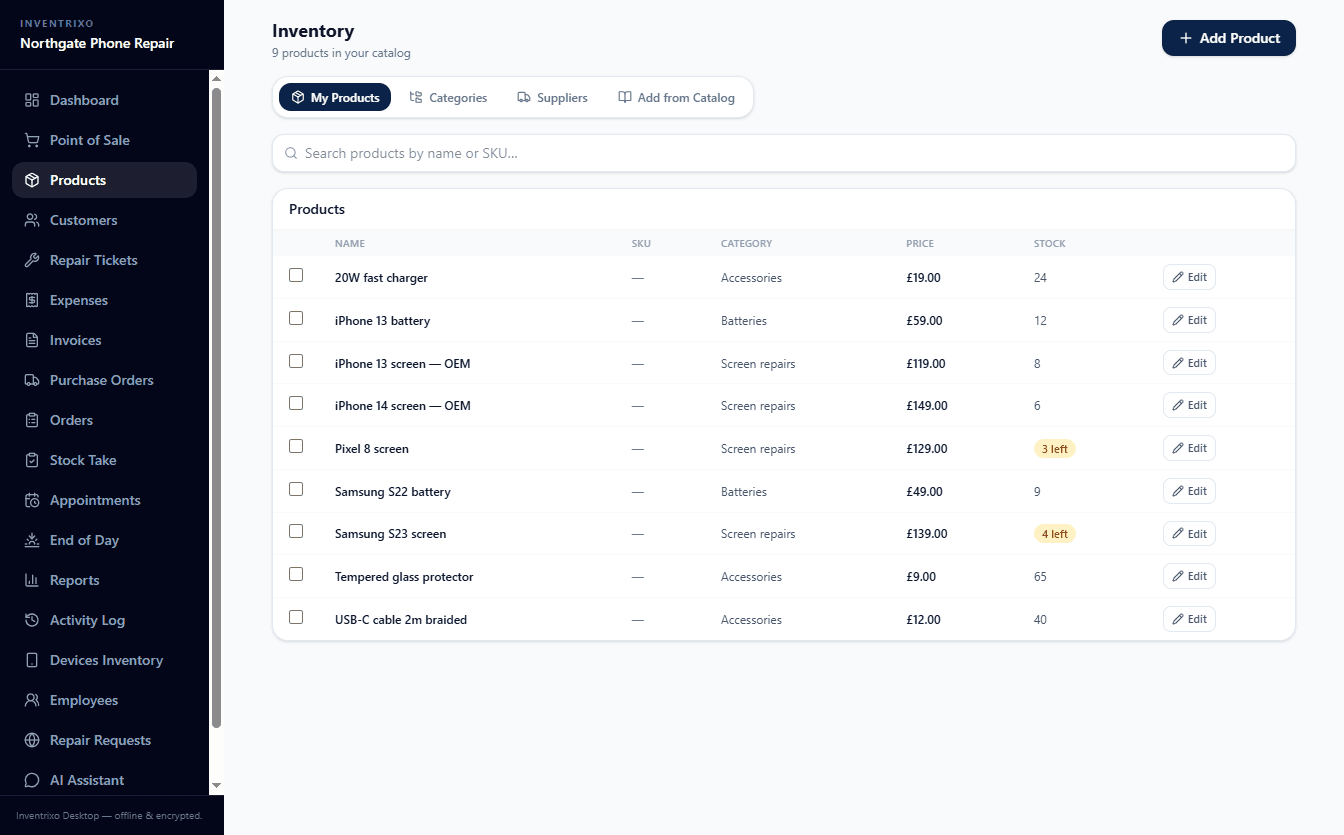
The till, the stock count and the branch it is held at should always agree. Every product carries its cost, its price and its count, and the sale reduces that count in the same step.
- Cost, price and count on one row
- Margin sits next to the price, so a discount at the counter is an informed one.
- Phones are tracked one by one
- Anything with an IMEI is held as an individual unit rather than a quantity, so you can say which phone you sold and which are left.
- Stock-takes and purchase orders
- Count the shelf against the system, record the difference, and book new stock in against the order that brought it.
- A catalogue to start from
- A bundled catalogue of 456 products — devices, cases, screen protectors, charging, audio, parts and tools — imports straight into your inventory.
Online or offline — your call
Most point-of-sale software stops when the connection does. Inventrixo comes two ways — a browser app and a Windows desktop app — and your plan includes both. They keep separate records, so choose the one that fits how your shop trades.
In the browser
For a shop with a reliable connection and more than one location to keep in step.
- Open it in any browser, on any device
- Several branches and staff on one account
- Nothing to install, always current
On the counter PC
For a shop that cannot afford to stop trading because a line went down — or that would simply rather its customers' details never left the building.
- Sell with the internet completely down
- Records encrypted on your own machine
- Receipts, cash drawer and labels on the counter
One thing to know before you choose: the browser app and the desktop app keep separate records. Use the browser for your online account, and the desktop app for offline sales with encrypted local backups. Your plan covers both.
One system for the whole counter
Not a point of sale with add-ons bolted to it. Sales, stock and repairs share one set of records, so a repair booked at the counter shows up in the day's takings and against the customer without anyone typing it twice.
- Point of sale
- Ring up a sale in seconds, take part-payments, print the invoice, reconcile the cash at close.
- Stock and inventory
- Products, categories, purchase orders and stock-takes — including serialised units tracked by IMEI.
- Repair tickets
- Log the job, track its status, record the device, and let the customer follow it from a link.
- Device history
- A returning phone is recognised by its IMEI or serial, so you can see everything you did to it last time.
- Customers
- Every purchase, repair and invoice against one record, so the person at the counter is not a stranger.
- Reports
- Sales, stock, repairs and expenses — per branch, per member of staff, per day.
- VAT and sales tax
- UK and EU shelf prices carry VAT and the invoice discloses it. US and Canadian tax is added at the till.
- End of day
- Close the till against what the drawer actually holds, with the difference recorded rather than hidden.
Runs on what you already have
No proprietary till to buy from us, and no Inventrixo-specific drivers. If you have a computer and a till printer, you have what you need.
Any modern browser
Chrome, Edge, Safari or Firefox — on Windows, a Mac, an iPad, an Android tablet or a phone. Nothing to install.
Needs an internet connection
Windows 10 or 11
The desktop app, installed on the counter PC. Everything works with the internet down, and your records stay encrypted on that machine.
64-bit. No Mac or Linux build yet — use the browser
And the counter hardware you own
Inventrixo speaks the command sets these devices' manufacturers publish — ESC/POS, Star Line Mode, ZPL and TSPL — so most equipment already on a shop counter works without buying anything new.
Compatible with

- Star Micronics

- Honeywell
- DYMO
- TSC
- Bixolon
- APG
- MMF
Manufacturer names say which equipment we write to. They are not partners, and a name here is not a certification or a claim that a specific model has been tested.
Receipt printers
Epson · Star Micronics · Bixolon · Rongta · XPrinter
Cash drawers
APG · MMF · any RJ11/RJ12 drawer
Barcode scanners
Honeywell · Zebra · Symbol · any HID scanner
Label printers
Zebra · TSC · DYMO
Six things we can prove
Each claim describes something in the software, not something in a marketing plan. Where a guarantee belongs to someone else, we say whose it is.
Local-first
Run the desktop app and your shop's records stay in an encrypted file on your own computer. They are not uploaded to us.
AES-256 encryption at rest
The desktop database is encrypted with AES-256-GCM, with keys strengthened by PBKDF2-SHA256 at 210,000 iterations. Tampering is detected, not silently accepted. This describes the desktop app's local database only.
Payments handled by Lemon Squeezy
Card details are entered on Lemon Squeezy's hosted checkout, which is PCI-DSS Level 1 certified. Inventrixo never sees or stores a card number. The certification is theirs, not ours.
Your data, exportable
Export everything as JSON plus a spreadsheet per table, any time, including after a subscription lapses. No export fee, no support ticket.
No hostage-taking
If your subscription lapses you keep read access to every record. We do not hold your data hostage.
What happens if a subscription lapsesProcessor terms for UK and EU shops
A written Data Processing Agreement covering Article 28, sub-processors and international transfers is published, not held back for a sales call.
Read the DPA
We do not claim a GDPR certification, because no such certification exists to hold. Our privacy policy and DPA set out what we do with data, where it is held, and who else touches it. Read them and judge for yourself.
Pricing
Every plan includes both the online web app and the offline desktop app. Prices in USD.
Basic
Perfect for small sales and repair shops
Billed monthly
30-day free trial
- Sales and repair workflow
- 1 branch
- 5 total users
- 1 manager account
- 3 cashier accounts
- Unlimited products
- Inventory, POS, customers, invoices
- Online web + offline desktop included
Pro
For growing businesses
Billed monthly
14-day free trial
- Sales and repair workflow
- 3 branches
- 10 total users
- 3 manager accounts
- 6 cashier accounts
- Unlimited products
- Multi-branch and reports
- Online web + offline desktop included
Enterprise
For large operations
Billed monthly
Custom onboarding
- Sales and repair workflow
- Unlimited branches
- Unlimited users
- Unlimited manager accounts
- Unlimited cashier accounts
- Unlimited products
- Online web + offline desktop included
Prefer to try first? Start a free trial and add payment later from your billing page. Enterprise is tailored —talk to sales.
Getting started takes three steps
In this order, because each one needs the one before it.
Step 1: Start the free trial
Create your account with an email and a shop name. No card is asked for: the trial is 30 days on Basic or 14 days on Pro.
Step 2: Bring in what you sell
Import the bundled catalogue of 456 products or add your own, then set prices and starting stock counts for your shelf.
Step 3: Ring up the first sale
Sell something, or take a repair in. Want the counter to keep trading with the internet down? Install the Windows desktop app as well.
Questions shop owners ask
Straight answers, including the ones that are not flattering. Something missing? Ask us on a demo call.
Does it work without the internet?
The Windows desktop app does: you can sell, take repairs in and close the day with the connection down, and your records stay encrypted on that PC. The browser app needs an internet connection.
Do the browser app and the desktop app share records?
No. They keep separate records. Use the browser for your online account and the desktop app for offline sales with encrypted local backups. Both are included in every plan.
Does it run on a Mac?
There is no Mac or Linux desktop app yet; the installer is for 64-bit Windows 10 and 11. A Mac, iPad or Android tablet can use the browser app in Chrome, Edge, Safari or Firefox.
Will it work with my receipt printer, scanner and cash drawer?
Inventrixo speaks ESC/POS, Star Line Mode, ZPL and TSPL, the command sets most counter equipment already uses. We have not tested every model, so we do not promise any single one. USB thermal printers usually need the maker's Windows driver installed. The hardware page has the detail.
Hardware compatibilityDo I need a card to start the trial?
No. The free trial is 30 days on Basic and 14 days on Pro, with no card required. When it ends you choose a plan, or you stop.
How is VAT or sales tax handled?
UK and EU shelf prices include VAT, and the invoice shows the net amount and the VAT separately. In the US and Canada, sales tax is added at the till on top of the shelf price.
How many branches and staff can I have?
Basic is one branch and 5 users. Pro is up to 3 branches and 10 users. Enterprise is set up with you.
See the plansWhat happens to my data if I stop paying?
You keep read access to every record, and you can export everything as JSON plus a spreadsheet per table, with no export fee.
Read the termsWhere is my data kept, and who else sees it?
On the desktop app it stays in an encrypted file on your own PC. For the browser app, our privacy policy and Data Processing Agreement say what is held, where, and which sub-processors are involved. Card details go to Lemon Squeezy and never touch us.
Read the privacy policyTry it on your own counter
Start the free trial with your real products and prices: 30 days on Basic, 14 on Pro, no card required. Prefer to see it first? We will walk you through it live.